Broker Reviews · Intermediate
TradeSmart Review (2026): An Honest Look After 5 Years of Daily Trading
I have been trading Nifty options and equities on TradeSmart for over five years. Not as a test, not as a reviewer, but as my primary broker for real money across real market conditions including COVID volatility, election day swings, RBI announcements, and the 2026 geopolitical selloff. What follows is the honest picture: what works, what does not, and who TradeSmart is actually built for.
In This Article
- Who Is TradeSmart? A Quick Background
- Brokerage Plans: Power Plan (Rs 15) vs Value Plan Explained
- Platform Review: SINE, Web, Mobile, Desktop
- Feature Deep-Dive: The Tools That Actually Matter
- Charts and Third-Party Integrations
- The Support Story: Why This Is TradeSmart's Biggest Edge
- Who TradeSmart Is and Is Not For
- TradeSmart vs the Competition: Head-to-Head
- My Honest Verdict After 5 Years
Who Is TradeSmart? A Quick Background
TradeSmart Fintech Securities Limited is a Mumbai-based SEBI-registered discount broker operating under its parent company VNS Finance and Capital Services, which has been in the broking business since 1994. That 30-year legacy is not marketing copy. It is the reason TradeSmart has survived multiple market cycles, regulatory overhauls, and technological shifts while many newer fintechs have come and gone.
The brand is not widely visible in mainstream media. You will not see TradeSmart advertising on cricket jersey sponsors or late-night IPL ad slots the way Zerodha, Angel One, or Groww do. This understated presence is, in my experience, partly a deliberate choice and partly a reflection of where their energy actually goes. They are a product-first broker who has been quietly building features that serious traders need, without the marketing noise that surrounds the bigger names.
Brokerage Plans: Power Plan (Rs 15) vs Value Plan Explained
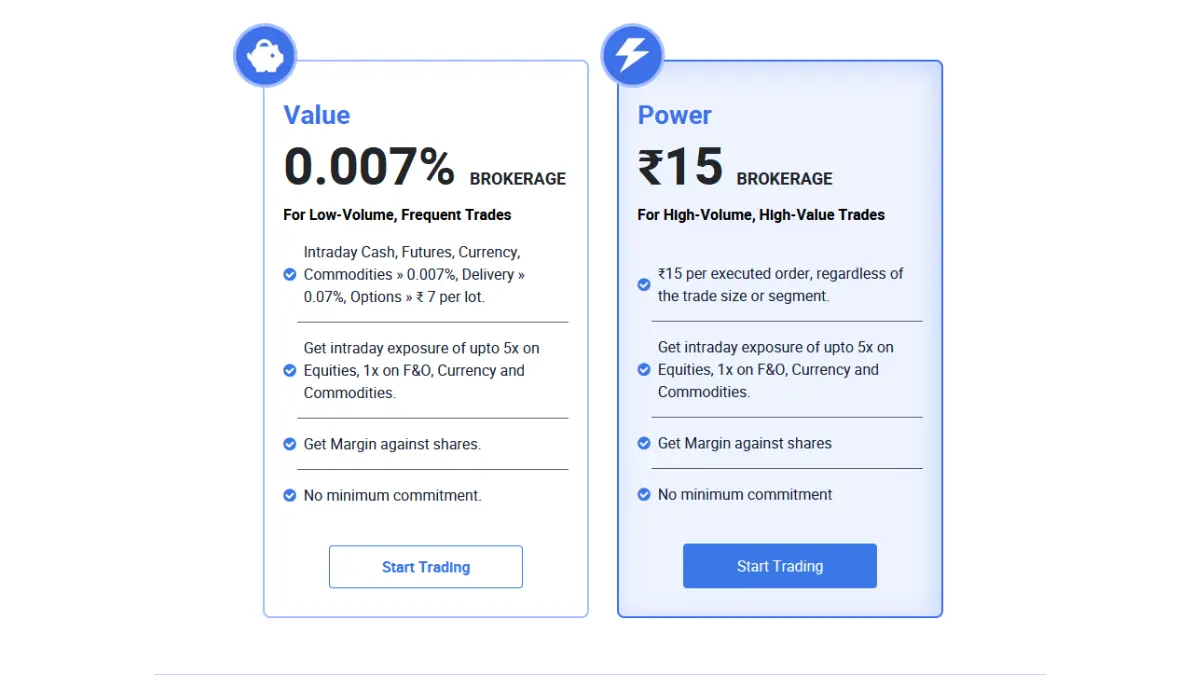
TradeSmart offers two plans and the difference between them is more nuanced than the headline numbers suggest. Most reviews just list the rates and move on. Let me explain what each actually means for your cost structure.
Power Plan: Flat Rs 15 Per Executed Order
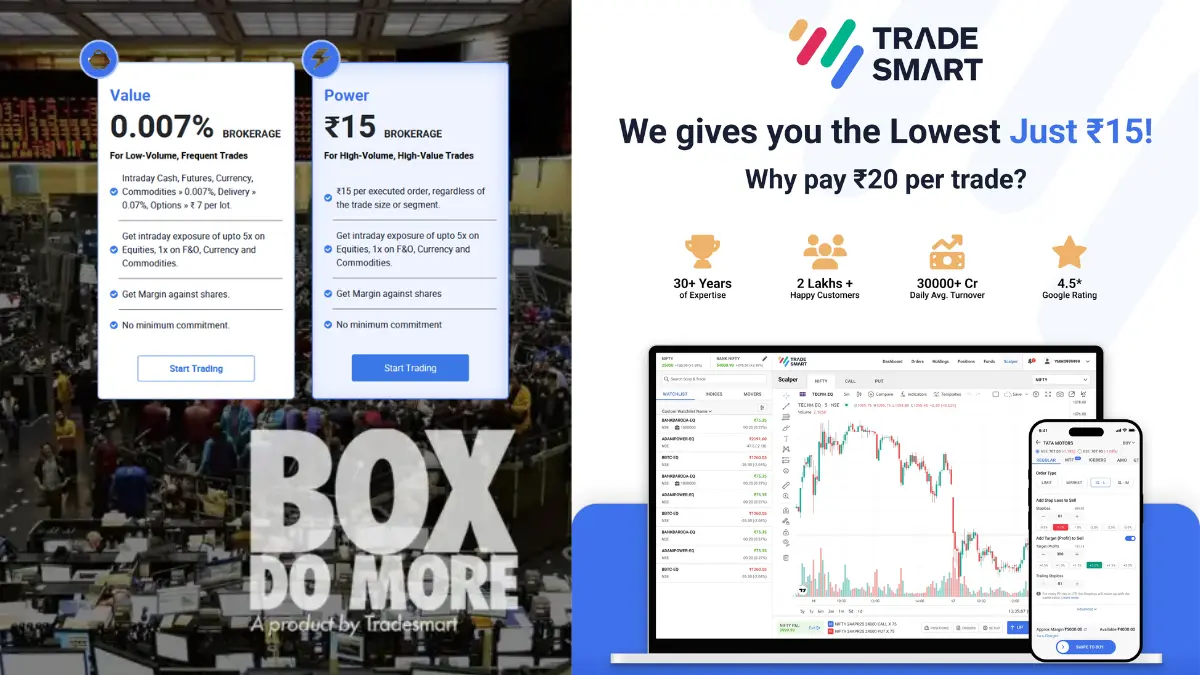
The Power Plan is built for high-volume, high-value traders. At Rs 15 per executed order, regardless of trade size or segment, it is the lowest flat-fee brokerage available at any SEBI-registered broker in India as of 2026. Zerodha, Upstox, Angel One, and 5paisa all charge Rs 20 per executed order. That Rs 5 difference adds up. A trader executing 100 orders a month saves Rs 500 per month, or Rs 6,000 per year, purely on brokerage. Over five years that is Rs 30,000 in direct savings, before you even account for the compounding effect of that capital remaining invested. You can open a TradeSmart account here to get started.
The Power Plan covers every segment: Equity intraday, Equity delivery, F&O (Futures and Options), Currency derivatives, and Commodities (MCX). Both plans include intraday exposure of up to 5x on Equities and 1x on F&O, Currency, and Commodities, margin against shares, and no minimum commitment. You pay Rs 15 when an order executes. If an order does not execute, you pay nothing.
Value Plan: Percentage-Based for Low-Volume, Frequent Traders
The Value Plan charges 0.007% per trade for Equity intraday, Futures, and Currency. For Equity delivery it is 0.07%, and for Options it is Rs 7 per lot. TradeSmart positions this as the plan for low-volume, frequent traders where individual trade sizes are smaller and the percentage-based fee comes out lower than the flat Rs 15. If your average single options trade involves a notional value below approximately Rs 2.14 lakh, the percentage works out cheaper than the flat fee. For most active F&O traders placing standard to larger sized orders, the Power Plan at Rs 15 flat is the stronger choice.
Other Charges to Know
Beyond the brokerage, the standard regulatory charges apply: Securities Transaction Tax (STT), Goods and Services Tax (GST) at 18% on brokerage, SEBI turnover charges, stamp duty, and exchange transaction charges. These are the same across all SEBI-registered brokers and are not within TradeSmart's control. There is no Demat account maintenance charge (AMC) for the first year. You can switch between brokerage plans at any time by contacting support, which I have done twice and found to be a straightforward process.
Platform Review: SINE, Web, Mobile, Desktop
TradeSmart provides four primary trading interfaces. Each has a distinct role and a specific type of trader it serves well. I have used all four at different points over the past five years, and my honest assessment of each follows.
SINE Mobile App (TradeSmart 2.0)
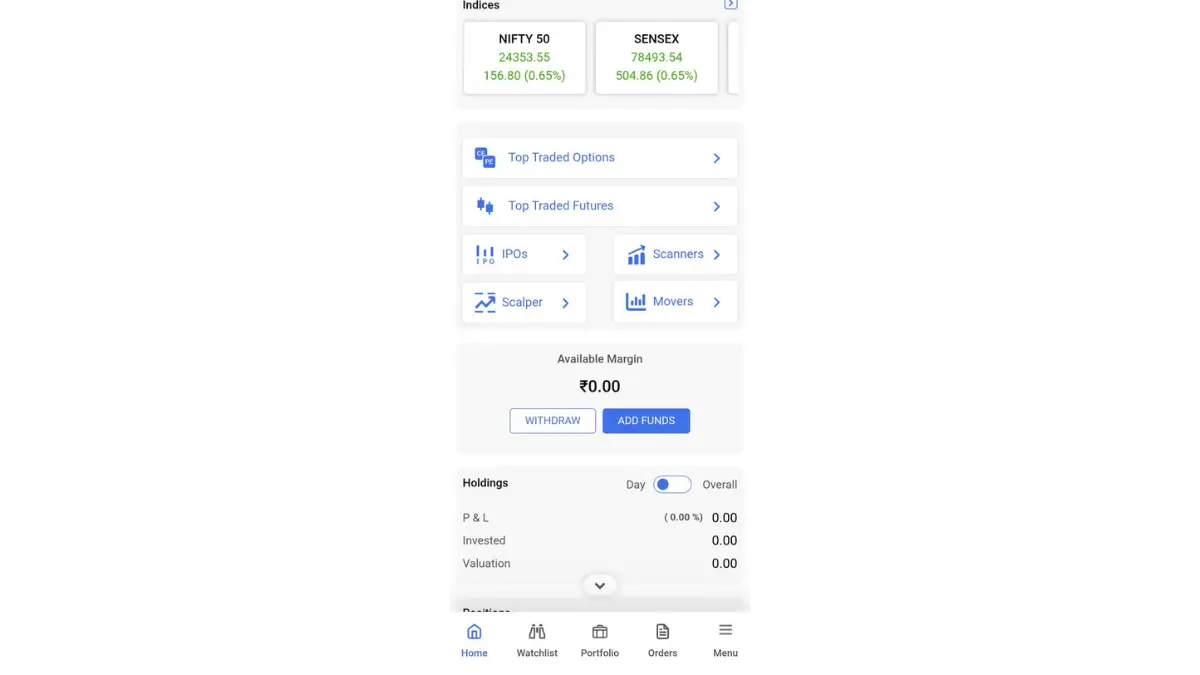
The mobile app is where most retail traders will spend the majority of their time, and it has improved substantially over the last two years. The current version offers biometric login, a clean order placement flow with all advanced order types accessible from the same screen (Regular, MTF, Iceberg, AMO, GTT tabs), and a Scalper mode that launches as a dedicated view for index options trading. The option chain is well-structured with weekly and monthly expiries clearly separated, and you can place orders directly from the chain without navigating to a separate order screen.
TradeSmart Web Platform
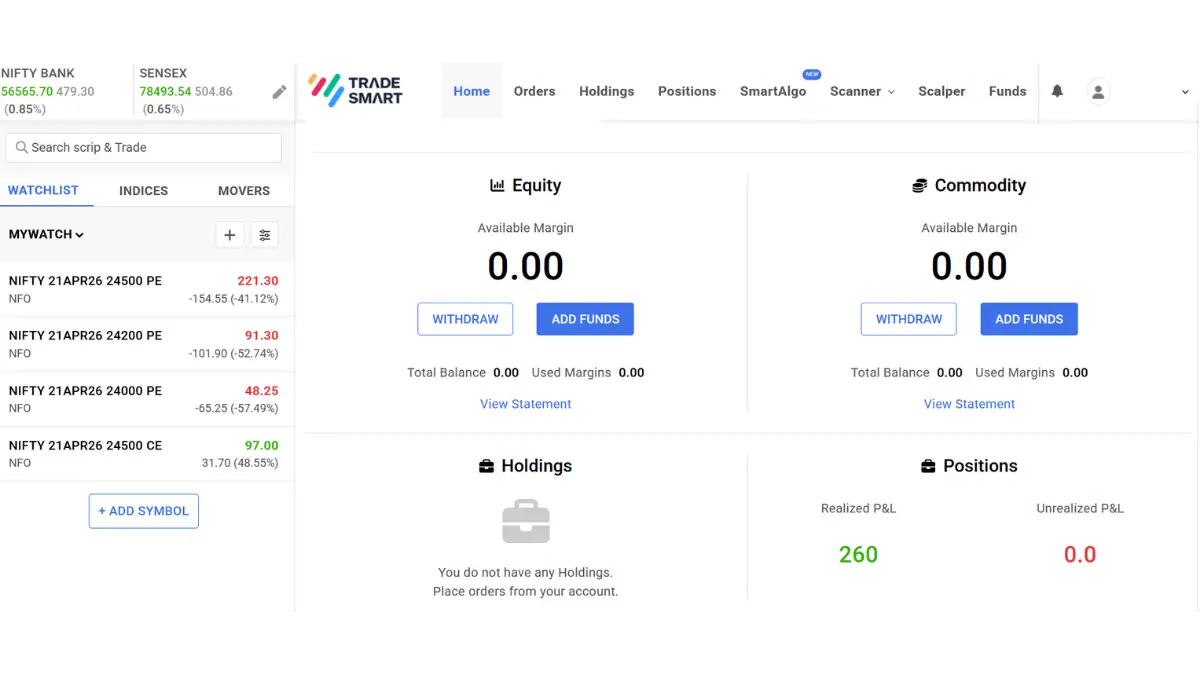
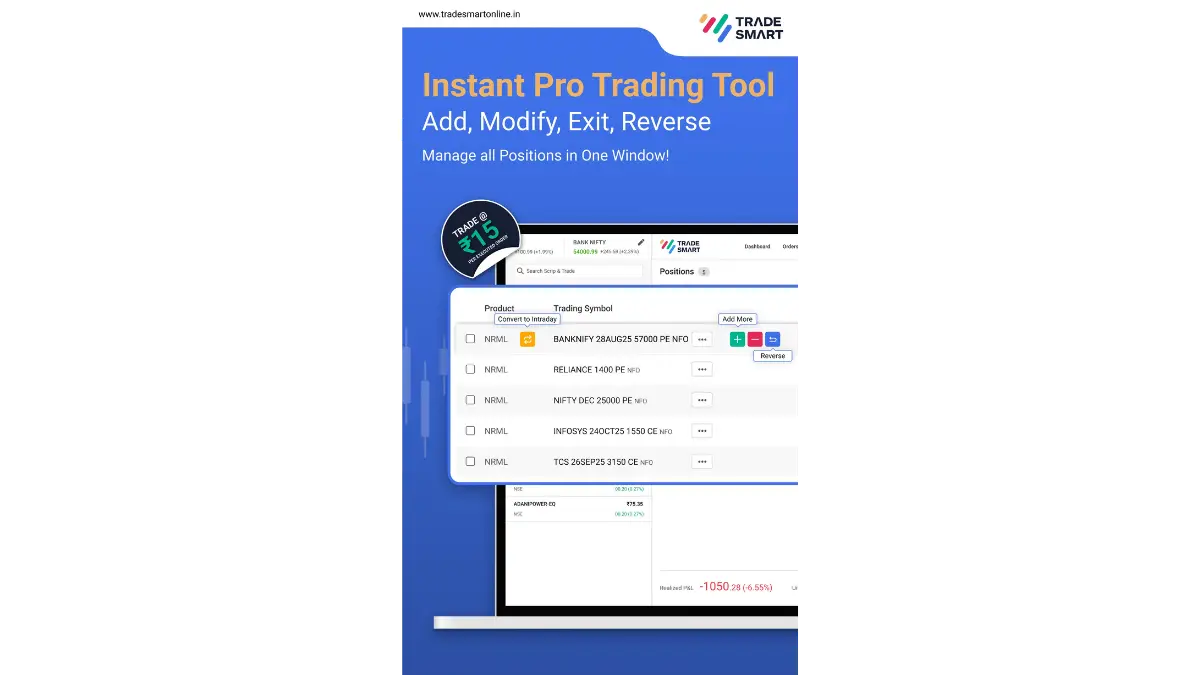
The web platform is browser-based, requires no installation, and works on any standard browser. For options traders who prefer to monitor multiple screens simultaneously on a desktop setup, this is where TradeSmart shines. The option chain view, combined straddle chart, OI statistics, PCR ratio, and Scalper mode are all accessible from one navigation bar. The Pro Trade Zone (their name for the position management dashboard) allows you to Add, Modify, Exit, and Reverse positions from a single window, which is significantly faster than navigating back and forth through a standard order book.
Desktop Application
The desktop app is oriented toward power users who want customisable layouts and the fastest possible order execution. It supports simultaneous logins, faster chart rendering, and an extended auto square-off window. If you are placing 30 or more orders per session, the desktop application's response time is noticeably better than the browser-based web platform. The Scalper mode on desktop has an additional advantage: side-by-side display of the index chart and live P&L, which is the closest thing to a professional trader's setup that TradeSmart offers.
Trading API
TradeSmart provides a free trading API for algo traders and developers. It supports Python and Java, offers real-time data webhooks, and covers order placement, modification, cancellation, and portfolio management. The API is free of charge, which differentiates it from brokers that charge Rs 500 to Rs 2,000 per month for API access. For traders who want to build their own execution systems or backtest strategies with live execution, this is a meaningful differentiator.
Feature Deep-Dive: The Tools That Actually Matter
TradeSmart's feature set is genuinely competitive at a level most reviews underestimate. The reason it is underestimated is that TradeSmart does not market these features aggressively. Below I explain each significant feature honestly, based on five years of actual use.
Scalper Mode: Fast Index Options Execution
Scalper Mode is TradeSmart's most differentiated feature for active options traders. It is a dedicated trading interface that combines the Nifty (or Sensex) price chart, call and put premiums for the nearest strikes, live P&L on open positions, and one-click buy/sell buttons into a single screen. The entry logic is simple: select the index, select Call or Put, and execute. There is no navigating back to the order form after placing a trade. This matters more than it sounds on high-gamma days near expiry when a 50-point Nifty move in 60 seconds demands an immediate response.
I use Scalper Mode for most of my intraday Nifty options entries. The feature is accessible on both mobile and web. On web it displays the TradingView chart alongside the order panel, which means you have a complete picture without switching windows. The limitation is that Scalper Mode is optimised for index options. For equity F&O, the Pro Trade Zone is more useful.
Pro Trade Zone: One-Window Position Management
Pro Trade Zone allows you to manage all open positions from a single dashboard with one-click actions: Add More, Reduce, Exit, Reverse, and Convert (from intraday to delivery or vice versa). For traders running multi-leg strategies like straddles, iron condors, or calendar spreads, this eliminates the friction of navigating to individual positions. You can select multiple positions simultaneously and exit them as a group. The Reverse button is particularly useful for options scalpers who want to flip from a long call to a long put quickly when Nifty reverses direction.
GTT Orders: 365-Day Stop-Loss and Target
Good Till Triggered orders allow you to set a stop-loss and a target price that remain active in the system for up to 365 days, without needing to log in again. For equity delivery investors who buy stocks and want a long-term trailing exit plan, GTT eliminates the risk of forgetting to reset your stop-loss after each expiry. You set it once, and it stays until it triggers or you cancel it. This feature is available in Regular, MTF, and Delivery order types, covering both equity and some derivative positions.
Iceberg Orders: Trade Beyond Freeze Quantity
The NSE has a freeze quantity limit for Nifty contracts (currently 1,800 units, which is approximately 1,200 lots at the current lot size of 65). Iceberg Orders automatically split a quantity that exceeds this limit into smaller sub-orders, each placed sequentially as the previous one fills. For traders building large positions in index futures or attempting to exit large options positions, Iceberg prevents order rejection and reduces market impact. It is a feature most retail traders never need, but for anyone managing meaningful capital in index derivatives, it removes a significant operational friction point.
Auto Order Slicing
Related to Iceberg but distinct, Auto Order Slicing breaks large orders into the maximum permissible quantity per order and places them sequentially for any stock or derivative where the desired quantity exceeds the exchange-permitted single-order limit. The platform informs you at order entry how many child orders will be placed. This is transparent and prevents the most common cause of order rejection for large-quantity traders.
Trailing Stop-Loss
The Trailing Stop-Loss feature moves your stop-loss upward automatically as the price rises in your favour. For every Rs 1 increase in the Last Traded Price, the stop-loss moves up by the same value, protecting progressively more of your profit. You set the trailing amount, and the platform handles the rest. For swing traders who want to let a position run while protecting against a sharp reversal, this feature is genuinely useful. It is not available on all instruments or in all segments, but for equity intraday and F&O it works as described.
Instant Pledge for Margin
TradeSmart's Instant Pledge feature allows you to use shares in your holdings as collateral to access margin, without waiting for the next settlement cycle. If you hold HDFC Bank, Reliance, or any other eligible scrip in your demat account, you can pledge it instantly from the Holdings screen and receive margin credit the same session. This allows you to trade options without parking separate cash, using your existing long-term portfolio as working capital. The process takes about 60 seconds in my experience.
MTF: Margin Trade Funding with 4x Leverage
TradeSmart's MTF (Margin Trade Funding) facility allows you to buy delivery stocks with up to 4x leverage, paying only a fraction of the position value upfront and holding the position overnight. This is distinct from intraday leverage: MTF positions can be carried for extended periods (subject to interest charges on the borrowed portion). For equity traders looking to build larger delivery positions than their immediate capital allows, MTF offers a formal regulatory mechanism to do so, unlike informal carry-forward arrangements. The interest charged on MTF positions is disclosed upfront and is competitive with other brokers offering the same facility.
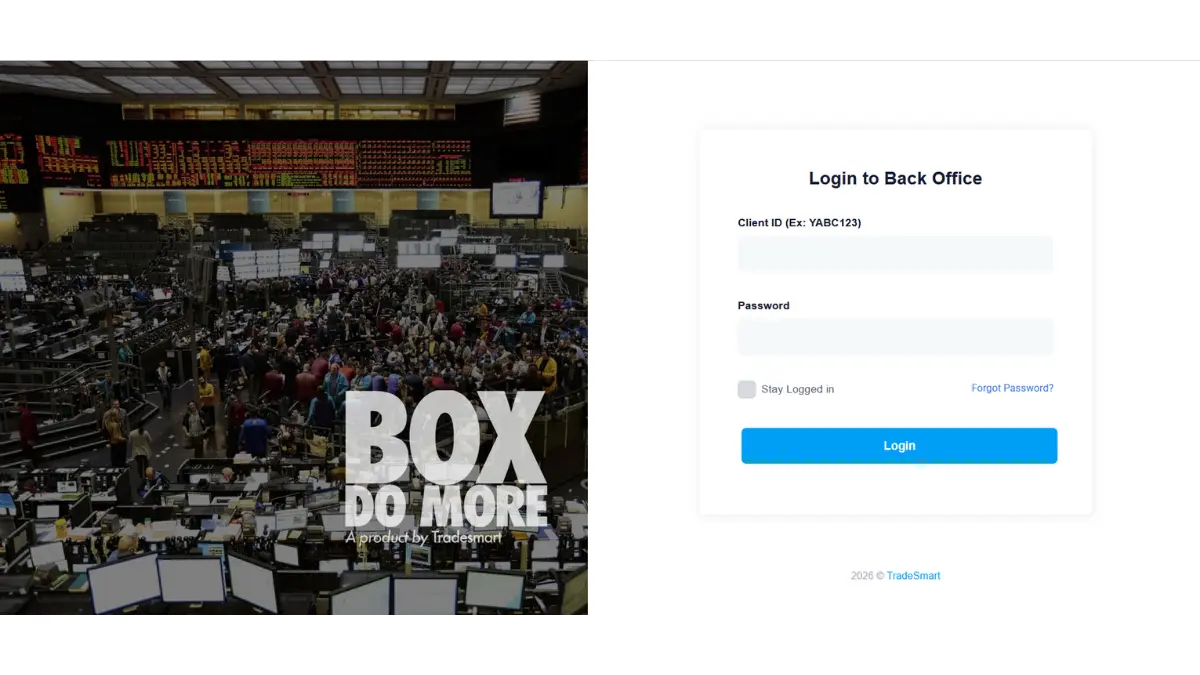
Back Office and Reports: BOX
TradeSmart's back office portal, called BOX, is where most traders spend very little time until they suddenly need it urgently. Having used it regularly for tax filing, position reconciliation, and ledger verification over five years, I can say it is comprehensive and well-organised. The Reports section inside BOX covers everything a serious trader needs, and the depth here is genuinely stronger than many competitors offer.
The available reports include Account Summary for a consolidated view of your entire account, Ledger for a complete transaction-by-transaction record of all credits, debits, and charges, Trade Details for a granular breakdown of every executed trade, and a standard P&L statement. For tax purposes, TradeSmart provides a dedicated Tax P&L report that separates short-term and long-term capital gains in a format that directly maps to ITR requirements. The Tax Loss Harvesting report is particularly useful at year end: it shows you which open positions are currently at a loss and how realising those losses before March 31 can offset taxable gains elsewhere in your portfolio. Contract Notes are generated automatically for every executed order and are available in BOX as well as delivered by email. The SLBM Positions report covers Securities Lending and Borrowing mechanism positions for those who use this facility.
Charts and Third-Party Integrations
TradeSmart integrates TradingView and ChartIQ directly within the platform, at no additional cost. This is worth highlighting because several brokers either charge for TradingView integration or offer a stripped-down version. TradeSmart's integration gives you access to the full TradingView indicator library, custom script indicators, and the ability to draw on charts and execute trades directly from the chart interface without opening a separate order window.
Third-Party Ecosystem
TradeSmart has built out a meaningful integration ecosystem that is not prominently advertised but is genuinely useful. The supported third-party platforms fall into several categories that cover the full spectrum of trading tools most serious traders need.
For options analysis, TradeSmart integrates with InstaOptions, DiPulse, Strike, and Quantower. For algo trading and strategy automation, it connects to Stratzy, Quantman, and AlgoTest. For portfolio tracking, MProfit is integrated. For scalping tools, 1mCliq is supported. For investment advisory services, Value Stocks and 5nance are connected. For charts beyond TradingView and ChartIQ, GoCharting integration is available.
This range of integrations means TradeSmart functions as the execution engine for a full ecosystem of specialised tools. A trader running backtested strategies on AlgoTest can route live execution through TradeSmart's API. An options analyst using Strike for open interest data can place orders without leaving their workflow. This is infrastructure that serious traders need and that TradeSmart has quietly built without much fanfare.
The Support Story: Why This Is TradeSmart's Biggest Edge
I am going to be direct here because this is the thing most reviews miss entirely. TradeSmart's support is the single biggest reason I have not moved to a different broker over five years, despite the occasional UI frustration or feature gap.
Every large broker in India claims to have good customer support. Most of them have support teams that issue ticket numbers, ask you to wait 24 to 48 hours, and resolve issues through email threads that take three days and four follow-ups. This is the industry norm.
TradeSmart is genuinely different. They are reachable by phone on 022-61208000 during market hours and beyond. The phone gets answered by a human who can actually resolve issues, not just log a ticket. They are reachable on WhatsApp, which for most active traders is the fastest possible communication channel. The typical response time on WhatsApp for a trading-related query during market hours, in my experience over five years, is under five minutes for most issues and under fifteen minutes for anything requiring back-office involvement.
This might sound ordinary. It is not. Try calling Zerodha's support during an expiry day when Nifty is down 300 points. The wait times during volatile sessions at larger brokers are a well-documented frustration in the Indian trading community. TradeSmart's smaller client base (relative to the top three or four brokers) means their support team is not overwhelmed on high-volume days in the same way. That accessibility is a genuine competitive advantage for active traders who sometimes need account-level issues resolved quickly during market hours.
"The difference between a broker you can call and a broker you can only email is the difference between a problem solved during market hours and a problem that costs you a trade. In five years, I have had TradeSmart resolve three account-level issues on the phone within 20 minutes of my call, on two of those occasions during live market hours. That responsiveness is not something I take for granted."
The other dimension of support worth noting is that TradeSmart does not have the same incentive problem that full-service brokers have. Because their brokerage is a flat fee regardless of trade size, their support team has no financial incentive to push you toward larger or more frequent trades. When you call with a question about whether a specific strategy or order type is appropriate for your account, the answer you get is uncoloured by commission considerations.
Who TradeSmart Is and Is Not For
I want to be honest about the fit here because no broker is universally the best choice. TradeSmart has genuine strengths and genuine gaps, and matching the broker to the trader matters.
TradeSmart Is Well-Suited For
TradeSmart Is Less Well-Suited For
TradeSmart vs the Competition: Head-to-Head
The table below compares TradeSmart against the five most widely-used discount brokers in India across the dimensions that matter most for active traders. All figures are based on publicly stated pricing and features as of April 2026. Figures marked with * are subject to change; always verify on the broker's official website before opening an account.
| Feature | TradeSmart ★ | Zerodha | Upstox | Angel One | 5paisa |
|---|---|---|---|---|---|
| Intraday / F&O brokerage | ₹15 flat | ₹20 flat | ₹20 flat | ₹20 flat | ₹20 flat |
| Equity delivery brokerage | ₹15 flat* | ₹0 (Free) | ₹20 flat | ₹0 (Free) | ₹20 flat |
| Demat AMC (annual) | ₹0 (Year 1 free) | ₹300/yr | ₹150/yr | ₹240/yr | ₹400/yr |
| Trading API | Free (full) | Free (personal, no market data) / ₹500/mo (full) | Free | Free | Free |
| TradingView charts | ✓ + ChartIQ | ✓ Free | ✓ + ChartIQ | ✓ + ChartIQ | ✓ + ChartIQ |
| GTT orders (365-day validity) | ✓ 365 days | ✓ (1 year) | ✕ | ✕ | ✕ |
| Iceberg orders | ✓ | ✓ | ✕ | ✓ | ✕ |
| Trailing stop-loss | ✓ | ✕ | ✓ | ✓ | ✕ |
| Scalper / fast options mode | ✓ (Scalper Mode) | Partial (Terminal) | ✕ | ✕ | ✕ |
| Instant pledge for margin | ✓ | ✓ | ✓ | ✓ | ✓ |
| MTF (margin trade funding) | ✓ (up to 4x) | ✕ | ✓ | ✓ | ✓ |
| Mutual fund investment | ✕ | ✓ (Coin) | ✓ | ✓ | ✓ |
| Phone / WhatsApp support | ✓ Both (fast) | Ticket + phone | Chat + email | Phone + chat | Phone + chat |
| Best suited for | Active F&O / scalpers / algo traders | Beginners + long-term investors | Tech-first retail traders | Active traders + research users | High-volume traders, cost-focused |
* All brokerage and AMC figures are based on publicly available information from each broker's official website as of April 2026 and are subject to change. Verify current rates directly with each broker before opening an account. Zerodha delivery brokerage is Rs 0 (free). TradeSmart delivery brokerage under the Power Plan is Rs 15 flat per executed order; under the Value Plan it is 0.07%. Features marked ✓ or ✕ reflect the reviewer's understanding of each platform's standard offering as of April 2026. This comparison is for informational purposes only and does not constitute a recommendation to choose any particular broker.
My Honest Verdict After 5 Years
TradeSmart is not trying to be Zerodha. It is not trying to be Groww. It is trying to be the most reliable, lowest-cost, feature-rich broker for traders who are serious about execution. On that goal, it succeeds consistently.
The Rs 15 flat brokerage is the lowest in the industry. The feature set, including Scalper Mode, Pro Trade Zone, GTT orders with 365-day validity, Iceberg orders, Trailing Stop-Loss, Instant Pledge, MTF, and a free API, is genuinely competitive with brokers charging more. The chart integrations with TradingView and ChartIQ, combined with third-party connections to algo platforms, options analytics tools, and portfolio trackers, mean TradeSmart functions as a full professional ecosystem, not just a basic execution broker.
The support is, in my honest experience, the best I have encountered from a discount broker in India. Being able to call and reach a knowledgeable human being during market hours, or send a WhatsApp message and receive a response in minutes, has solved real problems for me at moments when those problems could have cost money. That is not something you can easily quantify, but it is something every active trader will eventually need.
TradeSmart is not a platform that shouts for attention, and that is partly the point. The UI is functional rather than flashy, which suits traders who want to focus on execution rather than aesthetics. Mutual fund investment is not currently supported, so if SIPs are part of your financial plan, you would maintain a separate platform for that. The lower mainstream profile means you will not find as many YouTube tutorials or community threads dedicated to TradeSmart as you would for Zerodha, but the official support team compensates for this in a way no FAQ article can: you can simply call or WhatsApp them and get an answer in minutes. For a trader who already knows what they need from a broker, these are minor trade-offs against a genuinely strong feature set, the lowest brokerage in the industry, and support that is available when it matters most.
After five years, it remains my primary broker. That is the honest verdict. If you are evaluating a switch, you can open a free TradeSmart demat account here.
🎯 TradeSmart Review 2026: The Short Version
- Brokerage: Rs 15 per executed order (Power Plan), lowest flat-fee brokerage in India. Value Plan at 0.007% for low-volume, smaller-trade-size traders. No hidden fees, no minimum commitment.
- Regulatory standing: SEBI registration INZ000247736, NSE member 09643, BSE member 3279, MCX member 16830. Parent company VNS Finance operating since 1994. Clean record.
- Best features: Scalper Mode (index options fast execution), Pro Trade Zone (one-window position management), GTT orders (365-day validity), Iceberg orders (trade beyond freeze quantity), Trailing Stop-Loss, Instant Pledge, MTF up to 4x leverage, Free API.
- Charts: Full TradingView and ChartIQ integration at no extra cost. Trade directly from charts. 100+ technical indicators.
- Third-party integrations: AlgoTest, Quantman, Stratzy for algo trading; InstaOptions, Strike, DiPulse for options analytics; MProfit for portfolio tracking; GoCharting, TradingView, ChartIQ for charts.
- Support: Reachable by phone at 022-61208000 and on WhatsApp. Human response during market hours in under 5 to 15 minutes in most cases. This is genuinely uncommon among discount brokers.
- Limitations: No mutual fund investment. UI less polished than Zerodha or Upstox. Low mainstream visibility means fewer community resources. Not ideal for complete beginners.
- Honest verdict: The best low-cost broker for serious active traders who prioritise execution infrastructure, feature depth, and support accessibility over brand recognition and UI aesthetics.
Frequently Asked Questions
Is TradeSmart safe and SEBI regulated?
Yes. TradeSmart Fintech Securities Limited is a SEBI-registered broker with registration number INZ000247736. It is a member of NSE, BSE, and MCX, and a CDSL depository participant (IN-DP-CDSL-208-2003). Its parent company VNS Finance has been in the broking business since 1994. Client securities are held in each client's individual demat account, not in a pool account. All SEBI-mandated disclosures and margin rules are adhered to. You can verify the broker's credentials directly on the SEBI SCORES portal and the NSE/BSE broker directory.
How does TradeSmart's Rs 15 brokerage compare to other discount brokers?
TradeSmart's Power Plan at Rs 15 per executed order is currently the lowest flat-fee brokerage offered by any major SEBI-registered discount broker in India. Zerodha, Upstox, Angel One, and 5paisa all charge Rs 20 per executed order. The Rs 5 difference is meaningful for active traders: a trader placing 100 orders per month saves Rs 500 monthly, or Rs 6,000 annually, compared to the Rs 20 brokers. Over three to five years, that difference is a substantial amount of capital that can be redeployed into trades.
What is Scalper Mode on TradeSmart?
Scalper Mode is TradeSmart's dedicated trading interface for index options (primarily Nifty and Sensex). It combines the live index chart, call and put premiums for the nearest strikes, a one-click order execution panel, and real-time P&L for open positions into a single screen. It eliminates the need to navigate between chart, option chain, and order placement screens during fast-moving markets. It is accessible on both the mobile app and the web platform, with the web version offering additional chart width and the ability to view both Call and Put tabs simultaneously.
Does TradeSmart support algo trading?
Yes. TradeSmart provides a free trading API that supports Python and Java, covers order placement, modification, cancellation, portfolio management, and real-time data via webhooks. The API integrates with third-party algo platforms including AlgoTest, Quantman, and Stratzy. The API is free of charge, which distinguishes TradeSmart from brokers that charge a monthly subscription for API access. For traders building custom execution systems or using rule-based automation, TradeSmart's API infrastructure is a competitive offering.
What is the GTT order feature and how long can it be set?
GTT (Good Till Triggered) is an order type that remains active in TradeSmart's system until a specified price trigger is hit, for up to 365 days. You can set a stop-loss and a target price simultaneously, and both remain active without needing to log in again or reset them after each trading session. This is particularly useful for equity delivery investors who want to protect long-term stock positions with a standing stop-loss, or for traders who want pre-set entries at specific price levels without monitoring the market continuously.
How good is TradeSmart's customer support in practice?
Support is reachable at 022-61208000 by phone and via email at support@vnsfin.com. TradeSmart also offers WhatsApp support, which in the reviewer's five-year experience typically responds within five to fifteen minutes for trading-related queries during market hours. The team can resolve most account-level issues on a live call without requiring the standard 24 to 48-hour email resolution timeline common at larger brokers. The honest caveat is that this experience may vary by time of day and market conditions. During extreme volatility events (like a large expiry day selloff), wait times can be longer, though still generally faster than the industry norm at larger brokers.
Does TradeSmart offer mutual fund investments?
No, as of 2026 TradeSmart does not support direct mutual fund investment from within the platform. If mutual funds and SIPs are a central part of your financial strategy, a platform like Zerodha Coin, Groww, or a dedicated MF platform would be more appropriate. TradeSmart is focused on active trading in equities, F&O, commodities, and currencies. For pure investors with no active trading component, this limitation makes TradeSmart an incomplete solution as a sole financial platform.

Open a Free TradeSmart Demat Account
No AMC charges for the first year. Trade at Rs 15 per executed order across equity, F&O, currency, and commodity segments. Free API access included.
Check out TradeSmart →⚠️ Disclaimer and Disclosure: Please Read. This review represents the personal opinion of Feroz Omar, based on his individual experience as a TradeSmart account holder for over five years. This is not a sponsored post. This article may contain affiliate links to TradeSmart, through which the Author may earn a commission if you open an account; this commission does not affect the content, conclusions, or editorial independence of this review in any way. It is published on NiftyWise.org for educational and informational purposes only. Brokerage rates, features, and charges described in this article are based on publicly available information from TradeSmart and third-party sources as of April 2026 and are subject to change. All comparisons with other brokers are based on publicly stated pricing as of the same date. Investments in the securities market are subject to market risks. Trading in F&O carries substantial risk of loss and is not suitable for all investors. NiftyWise.org is not registered with SEBI as an Investment Adviser, Research Analyst, or Stockbroker. This article does not constitute investment advice or a recommendation to open an account with any particular broker. Please conduct your own research and consult a SEBI-registered adviser before making any financial decisions. Visit sebi.gov.in for a list of registered advisers. TradeSmart SEBI registration: INZ000247736. Contact: 022-61208000 | support@vnsfin.com | tradesmartonline.in.